 Mac · Dictation
Hold a key. Talk.
The text lands at your cursor.
Hold the right ⌥ and say what you mean. Let go, and the words appear in the app you were already in: the email to a client, the brief, the comment, the form. Hold the right ⌘ instead and the same sentence comes out translated.
- 7 days free, then from $19, once
- Speech recognised on your Mac
- macOS 15 or later, Apple silicon
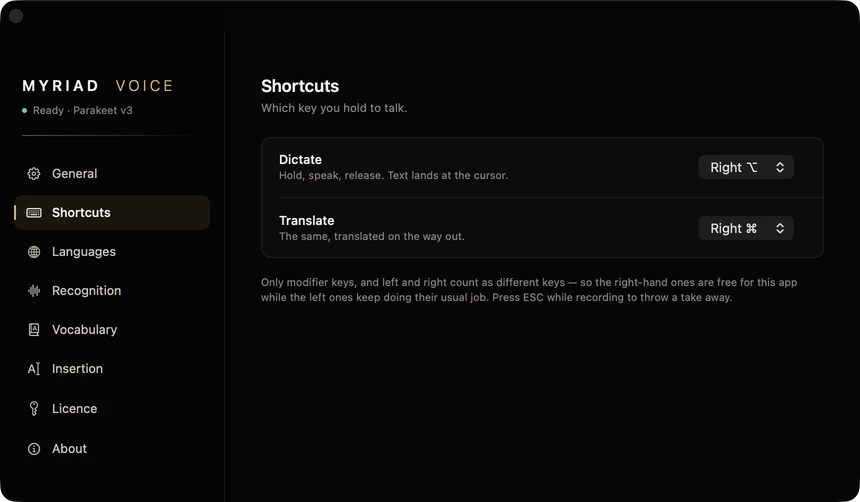
The real app: Settings, Shortcuts. Everyday use happens without this window.
There is no window to go to.
Most dictation tools ask you to open their window, speak, then copy the result back. Myriad Voice is a key you hold, wherever you are typing.
Right ⌥ dictates.
Hold it and talk. Let go, and the text goes in at the cursor of the app in front. Nothing to open, nothing to paste.
Right ⌘ translates.
The same hold-and-talk, with a translation on the way out. Speak Polish, get English, or another language you set.
Pick your own keys.
Either job can sit on any right-hand modifier, the left ⌥ or ⌃, or fn. Left and right count as different keys.
Escape throws a take away.
Started a sentence you did not mean? Press Escape while still holding. Nothing is transcribed, nothing is typed.
Your first word is kept.
The microphone stays open and the last half second of audio is held, so the start of a sentence is not lost while a cold microphone wakes up.
It lives in the menu bar.
No Dock icon and no window in your way. A small capsule shows while it listens. It can start at login.
Twenty-five languages. You pick yours.
The language you speak is a setting, not a guess. On a two-second sentence, guessing goes wrong often enough to matter, and a wrong guess quietly translates what you said.
- Pinned, never guessed. Choose the language you dictate in once. It stays chosen.
- Translate into the language you choose. English by default. Translation uses Apple's own on-device models, Apple Intelligence or Apple Translation, and needs macOS 26.
- Words it keeps getting wrong. Add a name or a product to the vocabulary with what to write instead, and the fix is applied every time.
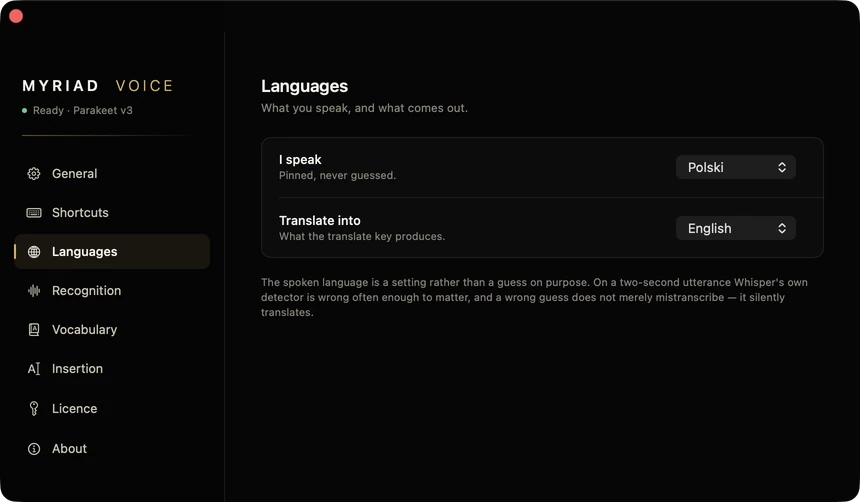
Settings, Languages. One language in, another out.
- Български
- Hrvatski
- Čeština
- Dansk
- Nederlands
- English
- Eesti
- Suomi
- Français
- Deutsch
- Ελληνικά
- Magyar
- Italiano
- Latviešu
- Lietuvių
- Malti
- Polski
- Português
- Română
- Русский
- Slovenčina
- Slovenščina
- Español
- Svenska
- Українська
The text arrives. Your clipboard survives.
Most complaints about dictation are not about hearing. The model heard you fine, and the text arrived in the wrong place, cut short, or ate what you had copied.
- Straight into the field. By default the text is written into the focused text field through macOS Accessibility, with no clipboard involved.
- A paste when an app refuses. Apps that do not accept a direct write get a paste, and whatever you had copied is put back afterwards.
- Or typed out. For the rare app that refuses both, switch Insertion to typing the characters one by one.
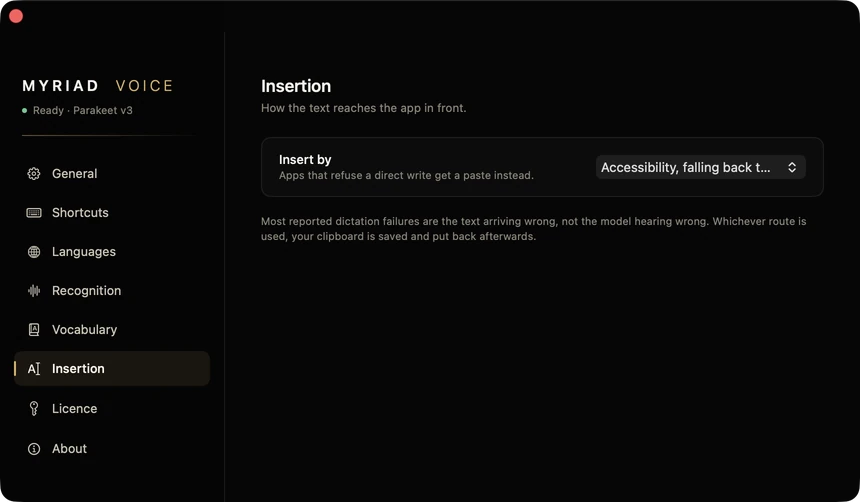
Settings, Insertion. Three ways in, one choice.
Your voice stays on your Mac.
Speech is turned into text by a model running on your Mac's Neural Engine. Your voice is not sent to us or to any speech service. If you are under an agreement that keeps a client's words off third-party servers, this is why it matters.
- Audio is not stored. It lives in a half-second buffer that is overwritten continuously. Nothing reaches the disk or the network unless you are holding a key.
- When it goes online. Once at setup, to download the 460 MB speech model. Once when you enter a licence key, to activate it. And when you press Check now for updates.
- Unclear audio is not pasted. If a longer take is too garbled to trust, the app types nothing and tells you it did not catch you, instead of pasting an invented sentence.
- No analytics. No tracking, no crash reporting, no usage statistics.
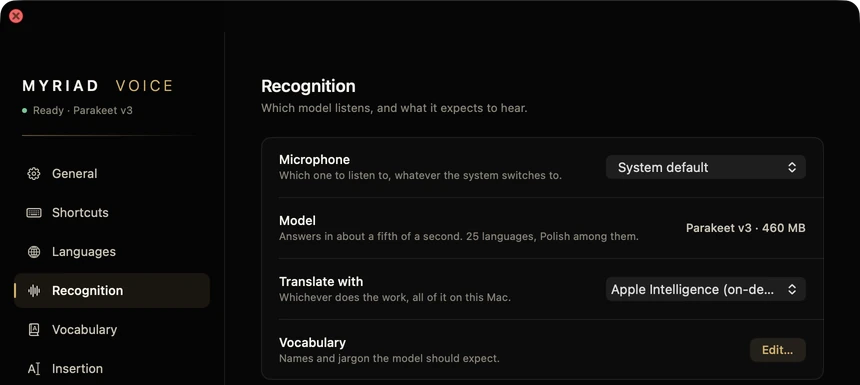
Settings, Recognition. The microphone you choose, the on-device model, the translator.
What it does not do yet.
It is an early version, 0.1. Here is where it stands, so you can decide before you install it.
Translation needs macOS 26.
Dictation works from macOS 15. The translate key uses Apple's translation, which arrived in macOS 26, so on older systems that key has nothing to call.
Apple silicon only.
The model runs on the Neural Engine in Apple's own chips. Intel Macs are not supported.
The orange dot stays on.
macOS lights it whenever an app holds the microphone, and this one holds it on purpose so your first word is not lost. Nothing is recorded unless you hold a key.
Updates are a button, not automatic.
Settings, General, Check now. If there is a new version, the download opens. It is not on the Mac App Store, because the store's sandbox forbids typing into other apps.
Seven days free. Then one payment.
No subscription. The version you buy keeps working. If it is not for you, you have 14 days from the purchase to change your mind.
Prices in USD; your local price and VAT are shown at checkout. The licence key appears on screen as soon as you pay. No account to create.
Frequently asked questions
In any app where you can type. Text goes in through Accessibility, falls back to a paste where an app refuses, and for the rare app that refuses both you can switch to typing the characters out.
Only to download the speech model once at setup and to activate your licence key. Dictation itself works offline.
Macs with Apple silicon on macOS 15 or later. Translation needs macOS 26. It needs about 460 MB of disk for the model.
Listening for a held key anywhere on the Mac and typing into other apps is exactly what the store's sandbox does not allow. So it comes straight from this site, signed with a Developer ID and notarised by Apple.
Dictation pauses until you enter a licence key. Buy once for 1, 2 or 5 Macs, paste the key in Settings, Licence, and it works again. There is no subscription.
Yes. Removing the licence on one Mac frees its slot for another.
No. It writes what it heard, plus the replacements you put in the vocabulary. The only rewriting is translation, and only on the translate key.
Something else? Ask a question · Support
What changed
- Setup no longer looks stuck at 50% when there is nothing to download.
- The minimum system version is now stated correctly everywhere: macOS 15.
- Choose your microphone in Settings, Recognition. The choice survives unplugging and reconnecting.
- Garbled audio no longer turns into an invented sentence. Short words on their own still work.
- Settings explains the orange microphone dot.
- First public release. Hold the right ⌥ to dictate, the right ⌘ to translate.
- Speech recognised on your Mac, in twenty-five languages.
Say it once. Keep working.
Seven days free, then $19 once for one Mac. If something would stop you from using it every day, tell us while it is still early.